
If you want to know how to register on GamesPK, the account creation process is fairly straightforward once you know what information is required. A new user normally needs to open the GamesPK registration page, enter the requested account details, create a secure password, and submit the form. After successful registration, the same credentials can be used to log in.
For Pakistani users, it is worth spending a few extra minutes checking the information entered during sign-up. A wrong mobile number, forgotten password, or incorrect account information can create problems later, particularly when account recovery or payments are involved. This guide explains the complete GamesPK registration process in simple language for beginners.
GamesPK Account Setup at a Glance
Before creating an account, it helps to understand what you are actually signing up for. GamesPK is an online gaming platform where registered users can access different games through a single account. Account features may include a gaming wallet, promotions, payment options, and other services available on the platform.
The registration process is mainly used to create your personal profile and login credentials. Once the account has been created, you should use the same information each time you sign in instead of repeatedly creating new accounts.
| Registration Detail | Information |
|---|---|
| Platform | GamesPK |
| Account Type | Online Gaming Account |
| Registration Method | Website / Mobile |
| Mobile Friendly | Yes |
| Password Required | Yes |
| Referral Code | May be available |
| Login Required After Sign-Up | Yes |
| Real-Money Features | Available |
| Internet Connection | Required |
| Pakistani Payment Options | May include JazzCash/EasyPaisa |
Payment methods, registration fields, bonuses, and other account features can change. The options displayed on the current GamesPK platform should therefore be treated as the latest instructions.
Important Point Need Before Creating an Account
Preparing your information before starting can save time. You should have access to a working mobile phone and a stable internet connection. If a phone number is requested, use a number you control rather than somebody else’s number.
You should also decide on a strong password before completing the form. Avoid using the password from your Gmail, Facebook, JazzCash, EasyPaisa, or banking account. Using a separate password reduces the damage if one account is ever compromised.
Keep these things ready:
- An active mobile number if requested
- A stable mobile-data or Wi-Fi connection
- A unique username
- A strong and separate password
- Correct personal information
- Access to the current GamesPK platform
- A referral code only if you genuinely want to use one
Step-by-Step GamesPK Registration Process
For a beginner, GamesPK registration is easier to understand when divided into individual steps. You first access the platform, locate the account creation page, enter the requested information, and submit the form.
Do not rush through this process simply because you want to start playing. Details entered during registration can later be connected with login recovery, account security, bonuses, and payment-related functions.
Step 1: Open the GamesPK Platform
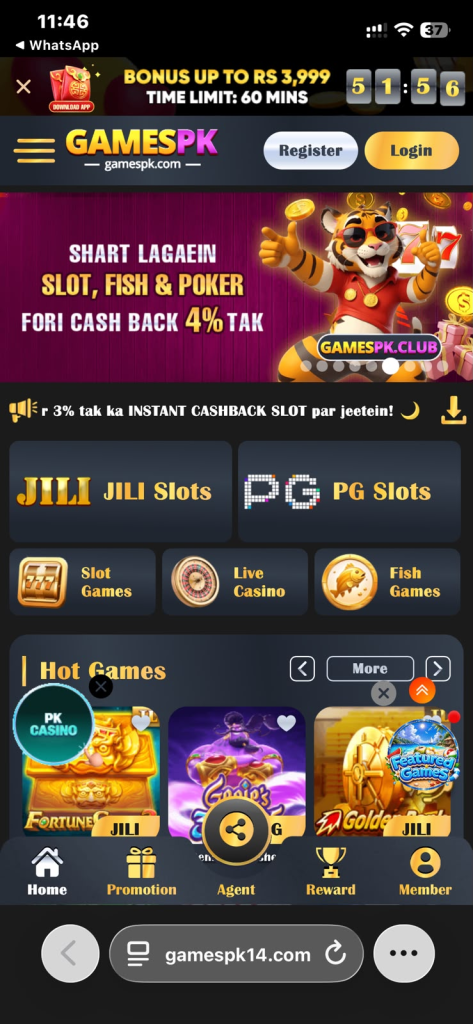
Start by opening the GamesPK platform through your Android phone or mobile browser. Make sure you have reached the service you actually intend to use rather than a look-alike page.
Avoid opening registration links received unexpectedly through unknown WhatsApp numbers, Telegram accounts, pop-up advertisements, or random social-media messages. This is particularly important when an account may later be connected with real-money transactions.
Step 2: Find the Sign-Up Option
Once the platform opens, look for an option labelled Register, Sign Up, or Create Account. It is normally visible around the account or login area.
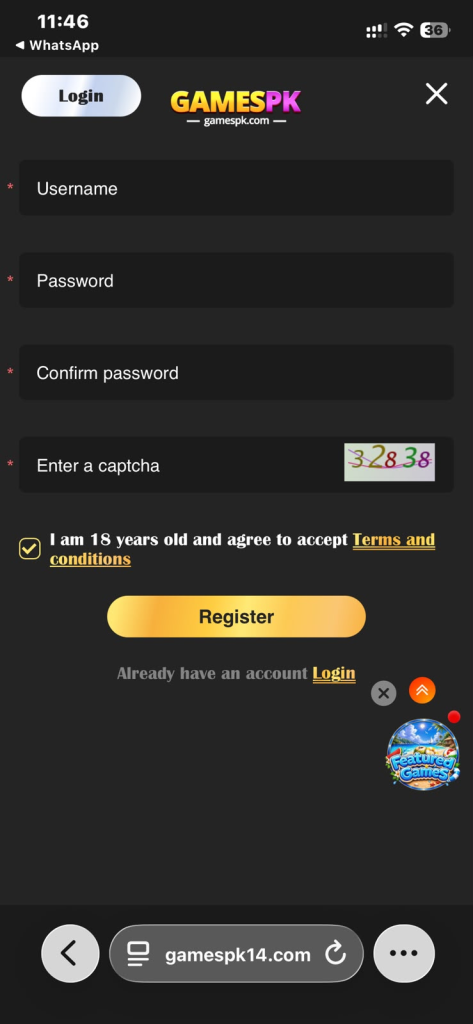
Tap it once and wait for the registration form to load. If nothing happens, check your internet connection before repeatedly pressing the button.
Step 3: Enter Your Account Information
The registration form will ask for the information required by the current platform. This may include a username, mobile number, password, confirmation password, or referral information.
Enter every detail carefully. If you provide a mobile number, check all digits before continuing. Incorrect information can make password recovery or account management more difficult later.
Step 4: Create a Secure Password
Your password is one of the most important parts of the GamesPK account. Avoid simple passwords based on your name, phone number, 123456, or other combinations that another person could easily guess.
A better password contains a mixture of characters and is not reused on another important service. Keep it private rather than sending it to a friend or saving it in a public WhatsApp conversation.
Step 5: Review Your Details Carefully
Before pressing the registration button, read the information you have entered one more time. Correcting an error now is much easier than trying to resolve it after the account has been created.
Pay particular attention to:
- Mobile number
- Username
- Password
- Confirm password field
- Referral code, if entered
- Any other required information
Also review the terms presented by the platform before agreeing to them.
Step 6: Complete Account Creation
When everything looks correct, press the final Register, Sign Up, or Submit button. Give the system a moment to process your request rather than submitting the same form repeatedly.
If registration succeeds, you may be taken directly to your account or asked to proceed to the login page. Keep your username and password secure because you will need them when signing in again.
GamesPK Registration Using an Android Phone
For many Pakistani users, Android is the easiest way to access GamesPK because a smartphone is more convenient than a computer. If you already have the GamesPK app installed, open it and locate its registration option.
Complete the sign-up form using the same care you would use on the website. Mobile users should be particularly careful with auto-fill because the phone can sometimes insert an old phone number, username, or saved password into the wrong field.
A typical mobile registration flow looks like this:
- Open the GamesPK application.
- Tap the account registration option.
- Enter the requested details.
- Create a secure password.
- Add a referral code only if required or desired.
- Review your information.
- Accept applicable terms.
- Submit the registration form.
- Wait for confirmation.
- Log in with your new credentials.
GamesPK Registration Through a Web Browser
Users who prefer not to start inside the Android application may be able to access GamesPK through a mobile or desktop browser. Chrome is commonly used on Android, although another modern browser can also work.
Once the GamesPK page opens, locate its registration section and complete the displayed form. The basic process should be similar to mobile registration: provide the requested information, create a password, review the details, and submit the account request.
Browser registration can be convenient when:
- You are using a laptop or desktop computer.
- You do not currently have the app installed.
- You prefer completing forms on a larger screen.
- You need to review account information more carefully.
How to Use a GamesPK Referral Code
A GamesPK referral code is generally associated with an existing user’s invitation. If the current registration form contains a referral field, a new user may be able to enter a code while creating the account.
Do not assume that entering a referral code automatically gives you withdrawable cash. Referral promotions can have eligibility, deposit, gameplay, or other conditions. Read the offer carefully before making financial decisions based on an advertised reward.
If you have a referral code:
- Copy it correctly.
- Enter it in the relevant field.
- Check for typing mistakes.
- Read any conditions connected with the referral.
- Do not deposit money solely because someone promises a referral profit.
What to Check Immediately After Creating Your Account
After successful registration, spend a few minutes exploring the account instead of immediately depositing money. Check that your profile information is correct and learn where important sections such as wallet, games, support, and account settings are located.
This is also a good time to read any terms related to bonuses and payments. A large bonus displayed on the screen does not necessarily mean the same amount can immediately be transferred to JazzCash or EasyPaisa.
After registration, check:
- Your username and profile details
- Wallet section
- Available games
- Account settings
- Customer-support section
- Deposit methods
- Withdrawal options
- Current bonus conditions
- Transaction history, if available
First GamesPK Login After Registration
Once your GamesPK account has been created, you can use the login section to access it again. Enter the same username, mobile information, or other login identifier you used during registration, followed by your password.
If the login fails on the first attempt, do not immediately create another account. First check for a typing mistake, confirm that your internet connection is working, and make sure the password is entered with the correct capitalization.
The normal GamesPK login process is:
- Open GamesPK.
- Select Login.
- Enter your registered account information.
- Type your password.
- Complete any security check shown.
- Tap the login button.
- Wait for the dashboard to open.
How to Protect Your New GamesPK Account
Account protection becomes even more important when a platform contains wallet or real-money features. A password should be known only to you. Someone claiming to be customer support should not need your secret wallet PIN or one-time password to solve an ordinary account problem.
Pakistani users who use JazzCash or EasyPaisa should be especially careful about OTP and PIN requests. Your GamesPK password, JazzCash MPIN, EasyPaisa PIN, email password, and OTP codes are different security credentials and should never be casually shared.
For better security:
- Use a unique GamesPK password.
- Never disclose an OTP.
- Never share your JazzCash MPIN.
- Never share your EasyPaisa PIN.
- Avoid unknown login links.
- Log out when using a shared device.
- Keep transaction screenshots when money is involved.
- Do not allow another person to operate your account.
Registration Problems and Their Solutions
Sometimes the registration form does not work on the first attempt. This can happen because of incorrect information, an existing account, poor internet connectivity, password requirements, or a temporary platform problem.
The best approach is to identify the exact error shown on the screen rather than repeatedly creating accounts. Many common registration problems have relatively simple solutions.
| Problem | What You Can Try |
|---|---|
| Number already registered | Try account recovery instead of another sign-up |
| Username unavailable | Choose another unique username |
| Password rejected | Follow the password requirements shown |
| Page not loading | Check internet and reload |
| Registration not submitting | Review all required fields |
| Login fails after registration | Recheck username and password |
| App freezes | Restart the app or phone |
| Verification problem | Follow the current on-screen instructions |
Mobile Number Already Used
If GamesPK says your mobile number is already registered, it may already be associated with an existing account. Creating another account may not solve the problem.
Try the password-recovery process or contact the support option shown by the platform. Do not pay an unknown person who claims they can unlock the account privately.
Username Not Accepted
A username may be rejected because another user already has it or because the format does not meet current requirements. Try a different name while following the instructions displayed on the registration page.
Keep the username easy enough for you to remember without making it identical to a sensitive password or other private information.
Password Error
If your password is not accepted, check whether the registration page requires a particular length or combination of characters. Follow the requirements shown beside the password field.
Do not weaken your password simply to make registration easier. A strong password is particularly useful when an account can hold a gaming balance.
Registration Page Not Loading
A page that fails to load can be caused by slow mobile data, Wi-Fi problems, browser cache, temporary maintenance, or a platform-side issue.
Switch your internet connection, restart the browser, or wait and try again later. Avoid downloading unknown “fix” applications just because a webpage temporarily fails to open.
Account Created but Login Fails
If registration appears successful but you cannot log in, first check the exact username and password you entered. Remember that passwords can be case-sensitive.
Use the password-recovery option if available. Avoid creating several accounts simply because you forgot the credentials for the first one.
Can You Create More Than One GamesPK Account?
Do not assume multiple GamesPK accounts are allowed. Gaming platforms can restrict duplicate accounts, particularly when welcome bonuses, referral rewards, or payment methods are connected with them.
The safest approach is to maintain one account and check the current account rules before attempting to register another. Duplicate accounts can potentially create verification, bonus, or withdrawal problems if they conflict with platform rules.
If you lose access to an existing account:
- Try password recovery first.
- Check the registered information.
- Contact official support if necessary.
- Do not create repeated accounts just to claim new-user promotions.
Does GamesPK Require Account Verification?
Verification requirements can differ depending on the account feature being used. A basic registration may require less information, while some payment or account-recovery functions can require additional checks.
Only provide information through the platform’s recognized verification process. Be cautious if an unknown person contacts you privately and requests sensitive documents, passwords, wallet PINs, or OTP codes in the name of account verification.
If verification is requested, check:
- Why the information is required
- Where it is being submitted
- Whether the request appears inside the account
- What information the platform actually asks for
- Whether sensitive credentials are being requested unnecessarily
GamesPK Registration and Welcome Bonuses
New users may see promotions or welcome bonuses after completing GamesPK registration. These offers can make the platform look attractive, but a bonus displayed in the wallet should not automatically be treated as cash available for withdrawal.
Gaming bonuses commonly come with terms. These can include eligible games, wagering requirements, expiry periods, deposit conditions, or withdrawal restrictions. The exact terms should be read at the time the promotion is offered.
Before using a welcome bonus:
- Read its eligibility requirements.
- Check whether a deposit is needed.
- Review wagering conditions.
- Check its expiry date.
- Understand withdrawal restrictions.
- Do not deposit simply to chase a large advertised bonus.
Important Details Adding Money
Registration and depositing are two separate decisions. Creating a GamesPK account does not mean you need to add money immediately. New users should first understand how the wallet and withdrawal system work.
Before making any GamesPK deposit, check the current payment instructions carefully. Pakistani users may look for familiar options such as JazzCash and EasyPaisa, but payment availability can change and should be confirmed inside the current account.
Review these details first:
- Minimum deposit requirements
- Available payment methods
- Minimum withdrawal requirements
- Transaction limits
- Bonus restrictions
- Account-name requirements
- Withdrawal processing conditions
- Customer-support options
Never send another payment simply because someone tells you that an additional deposit is required to release earlier winnings without first checking the platform’s actual terms.
Is It Safe to Create a GamesPK Account?
Creating an account may appear simple, but GamesPK involves more than choosing a username and password because real-money gaming features can introduce both account-security and financial risks.
Users should access the platform carefully, use a unique password, and avoid sharing sensitive information. If using an Android APK, pay attention to the permissions requested by the application and Android security warnings.
There is also financial risk to consider:
- Deposited funds can be lost during gameplay.
- Winnings are not guaranteed.
- Bonuses can have conditions.
- Withdrawal processing can vary.
- Gaming should not be considered fixed monthly income.
No real-money gaming platform should be treated as completely risk-free.
Who Should Avoid Registering on GamesPK?
GamesPK may not be suitable for someone looking for guaranteed online earnings. Real-money gaming can produce losses, and winning in one session does not mean future games will produce the same result.
Users who cannot afford to lose money should avoid depositing funds. The same applies to anyone planning to borrow money, use household expenses, or chase previous losses with increasingly larger wagers.
You should avoid real-money gaming if:
- You expect guaranteed daily income.
- You need the money for household expenses.
- You intend to borrow money to play.
- You cannot comfortably accept a financial loss.
- You do not understand the game rules.
- You are below the applicable age requirement.
- Applicable laws or platform rules do not permit your participation.
- Gaming is already affecting your daily responsibilities.
GamesPK Registration Checklist
Before considering the registration complete, check the basic account information one final time. A short review now can prevent unnecessary problems with future login or account recovery.
Your GamesPK registration checklist should include:
- Correct mobile information entered
- Username saved
- Strong password created
- Password kept private
- Registration details reviewed
- Terms read
- Referral conditions understood
- Account login tested
- Support section located
- Payment rules checked before depositing
Frequently Asked Questions
Can I Register on GamesPK From My Mobile?
Yes, GamesPK is designed to be accessible to mobile users. You can follow the registration option available through the current mobile platform and complete the requested account details.
Make sure your internet connection remains stable while submitting the form. Do not repeatedly press the registration button if the page takes a few seconds to respond.
Do I Need a Mobile Number to Create an Account?
The information required depends on the current GamesPK registration form. If a mobile number field is mandatory, use a number that belongs to or is controlled by you.
Using an inaccessible number can create problems if the platform later uses it for account recovery or security checks.
Is GamesPK Registration Free?
Creating a GamesPK account is generally presented separately from depositing funds for real-money games. Users should check the current registration page for any applicable conditions.
Remember that free account creation does not mean all gameplay is free. Real-money games can require deposits or wagers.
What Should I Do If My Number Is Already Registered?
If your number is already registered, try recovering the existing account rather than immediately making a second one. Use the available password-recovery process or customer-support option.
This can help avoid duplicate-account problems and makes it easier to continue using the original profile.
Can I Change My GamesPK Password Later?
If password-management settings are available, users can change their password through the relevant account or security section. A forgotten password may also be reset through the available recovery process.
When choosing a new password, do not reuse your EasyPaisa, JazzCash, email, social-media, or banking credentials.
Do I Need a Referral Code to Sign Up?
A referral code may be available as part of GamesPK registration, but users should follow what the current sign-up form requires. Do not assume a referral automatically provides free withdrawable money.
Read the referral conditions first, especially when rewards depend on deposits, gameplay, or other actions.
Why Can’t I Log In After Registration?
Incorrect login details are one of the first things to check. Re-enter your username or mobile information and password carefully before assuming the account has a technical problem.
If the details still do not work, check your connection and use the available password-recovery or support options rather than creating multiple new accounts.
Final Registration Advice
Learning how to register on GamesPK is not difficult. The important part is creating the account correctly: access the intended platform, enter accurate information, choose a unique password, review the form, and keep your login credentials private.
After registration, explore the account and read the payment, bonus, and withdrawal conditions before adding money. For Pakistani users, JazzCash and EasyPaisa can make digital transactions convenient when available, but your PIN, MPIN, password, and OTP should never be shared with another person.
Finally, GamesPK should be approached as an entertainment platform rather than a guaranteed earning method. If you choose to participate in real-money games, use only money you can afford to lose and follow applicable age requirements, laws, and platform rules.